You work long hours, answer dozens of emails, and attend back-to-back meetings, yet at 5:00 PM, you realize you haven’t finished your most important tasks. Sound familiar? If you constantly feel busy but never feel productive, you don’t need a better to-do list or a fancier planner. You need a time audit.
Unlike a simple daily schedule, a complete time audit is a diagnostic tool. It forces you to look objectively at how you actually spend your minutes and hours, rather than how you think you spend them. By following these five simple steps, you will uncover hidden time leaks, identify your biggest time drains, and gain a realistic, data-driven plan to reclaim hours every single week. Whether you are a busy professional, a freelance creator, or a small business owner, this guide will help you take back control of your schedule and improve your work-life balance.
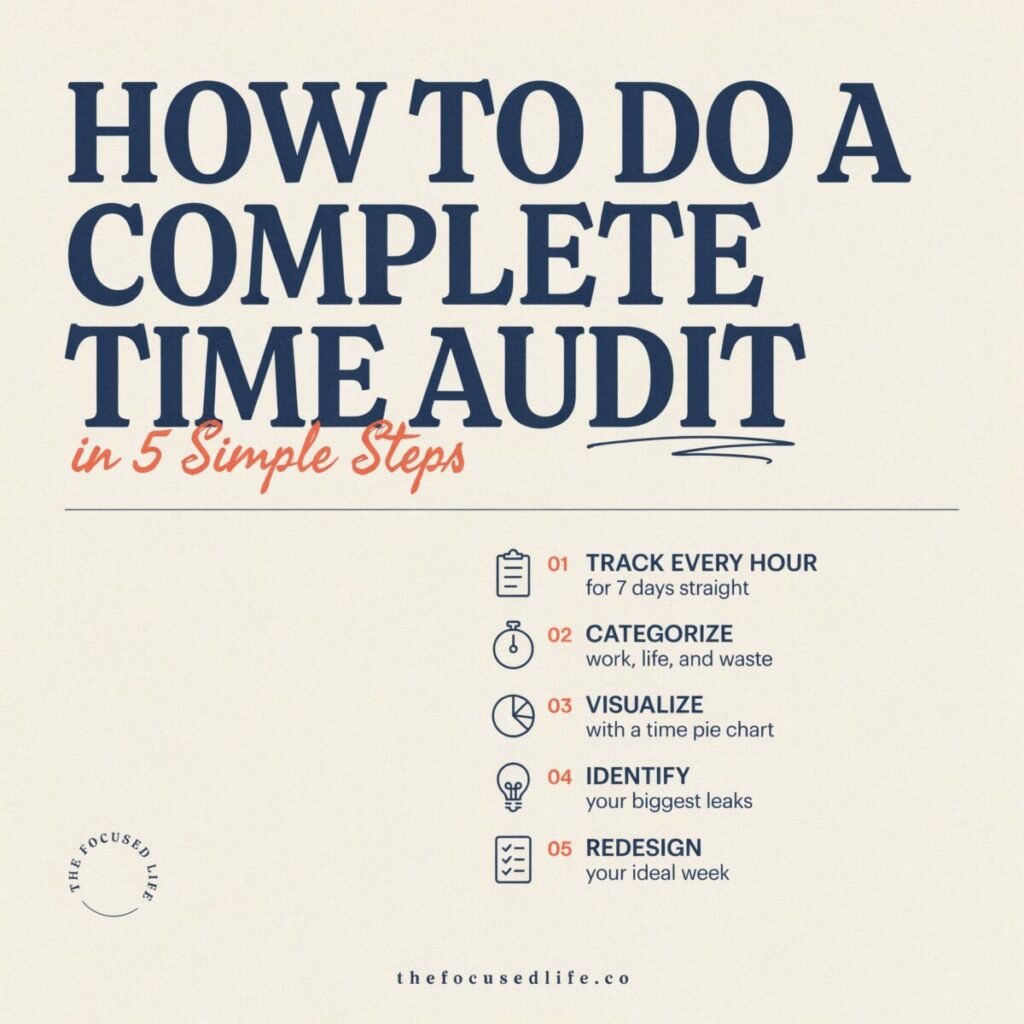
Why a Complete Time Audit Works
A time audit works because it replaces guesswork with hard data. Human beings are notoriously bad at estimating how long tasks take and where our time goes. We suffer from the “planning fallacy,” consistently underestimating the time required for future tasks.
When you perform a time audit, you unlock several powerful benefits:
- Data-driven decisions: You stop guessing and start making scheduling choices based on actual historical data.
- Improved focus: Identifying distractions allows you to protect your deep work sessions.
- Reduced burnout: Seeing exactly how many hours you work helps you set hard boundaries and prevent overworking.
- Better scheduling: You learn your true capacity, allowing you to say “no” to unrealistic deadlines.
A common misconception is that tracking your time means micromanaging your day or obsessing over every single second. In reality, a time audit is about spotting macro-patterns. It’s not about achieving 100% efficiency; it’s about ensuring your time aligns with your actual priorities.
Step 1: Define Your Goals and Time Categories
Before you start tracking, you need to know what you are looking for. A time audit without a goal is just a diary.
Set Clear Audit Goals
Ask yourself what you want to achieve. Are you trying to increase your focused work hours? Do you want to find out why you’re always working late? Are you trying to reduce the time spent in unproductive meetings or scrolling social media? Pick one or two primary objectives to keep your audit focused.
Create Practical Time Categories
To make sense of your data, you need to group your activities into logical buckets. Don’t create too many categories, or tracking will become a chore. Here is a solid baseline of categories to use:
- Deep Work: High-concentration, high-value tasks (writing, coding, strategizing).
- Shallow Work: Low-concentration, necessary tasks (replying to routine emails, organizing files).
- Meetings & Calls: Scheduled syncs, client calls, and team huddles.
- Admin & Operations: Invoicing, scheduling, software updates, and HR tasks.
- Learning & Development: Reading industry news, taking courses, or researching.
- Breaks & Personal: Lunch, coffee breaks, commuting, and personal errands.
- Idle / Distractions: Unplanned social media scrolling, chatting, or staring at the screen.
Example: If your goal is to “write a book,” your categories might be heavily weighted toward Deep Work (Writing), Research, and Admin, allowing you to see exactly how much time is stolen from your writing goals by administrative bloat.
Step 2: Choose Your Tracking Method and Tools
The best time tracking method is the one you will actually use. There are three main approaches to tracking your time, each with its own pros and cons.
1. Manual Journaling or Spreadsheets
- How it works: You write down your start and end times in a notebook or a simple Excel/Google Sheets template.
- Pros: Highly customizable, zero learning curve, no software required.
- Cons: Prone to human error, requires manual calculation, easy to forget to log.
- Best for: People who are highly disciplined or those who want to do a one-off, 3-day audit without downloading new software.
2. Active Time-Tracking Apps
- How it works: You use a tool like Toggl Track, Clockify, or Harvest to start and stop a digital timer for each task.
- Pros: Highly accurate, generates automatic visual reports, integrates with project management tools.
- Cons: Requires remembering to click “start” and “stop,” which can interrupt your flow.
- Best for: Freelancers billing by the hour, agency owners, and professionals who work on distinct, project-based tasks.
3. Passive Tracking and Calendar Audits
- How it works: You use tools like RescueTime or Rize that run in the background and automatically categorize your computer and phone usage. Alternatively, you simply color-code your existing digital calendar.
- Pros: Zero friction, captures digital distractions automatically, great for context-switching data.
- Cons: Can’t track offline work (like reading a physical book or in-person meetings) accurately.
- Best for: Digital marketers, software developers, and 9-to-5 employees whose work is entirely computer-based.
Recommended Starter Setup: For your first complete time audit, combine a time-tracking app like Clockify (for active tasks) with a quick end-of-day review of your calendar (to catch meetings you forgot to time).
Step 3: Track Your Time Accurately
Now comes the actual work. For a reliable time audit, you need to track your time for at least five to seven consecutive days. Here are the best practices to ensure your data is accurate and actionable.
Track in Real-Time (or Reconstruct Daily)
The golden rule of time tracking is to log your time as you do it. If you wait until Friday to remember what you did on Monday, your data will be useless. If you forget to track in real-time, do an “end-of-day reconstruction” where you spend 10 minutes reviewing your browser history, sent emails, and calendar to fill in the blanks.
Use 15-to-30 Minute Increments
Don’t track every 4-minute bathroom break. Round your time to the nearest 15 or 30 minutes. This prevents you from obsessing over micro-tasks and keeps your categories clean.
Log Interruptions and Context
If you are doing deep work but get interrupted by a colleague for 10 minutes, log that interruption. Tracking context switches is just as important as tracking the task itself, as it highlights hidden productivity killers.
Example Day Timeline
Here is what a well-tracked day looks like in practice:
- 8:00 AM – 8:30 AM: Shallow Work (Email triage and Slack catch-up)
- 8:30 AM – 10:30 AM: Deep Work (Drafting Q3 marketing strategy)
- 10:30 AM – 10:45 AM: Break (Coffee and walking)
- 10:45 AM – 11:45 AM: Meeting (Weekly team sync)
- 11:45 AM – 12:00 PM: Idle/Distraction (Scrolling LinkedIn)
- 12:00 PM – 1:00 PM: Personal (Lunch break)
Pro Tip: Set a recurring alarm on your phone or smartwatch every two hours that simply asks, “What are you working on right now?” This simple prompt will save you from hours of untracked time.
Step 4: Analyze the Data and Identify Time Drains
Once your tracking week is over, it’s time to crunch the numbers. This is where the magic happens. You are looking for the gap between how you want to spend your time and how you actually spent it.
Calculate Your Metrics
Open your spreadsheet or app dashboard and calculate the following:
- Total Hours Worked: The grand total of your tracked time.
- Category Percentages: What percentage of your week went to Deep Work vs. Shallow Work vs. Meetings?
- Average Session Length: How long did you focus on a single task before switching?
- Context Switches: How many times did you jump between unrelated tasks in a single day?
Look for Hidden Patterns and Time Leaks
Don’t just look at the totals; look at the flow of your day.
- Are your deep work sessions constantly fragmented into 20-minute chunks?
- Do you spend more time in meetings than actually executing the work discussed in those meetings?
- Is your “admin” time bleeding into your evenings?
A Real-World Example: Meet Sarah
Sarah is a freelance graphic designer who feels overworked and underpaid. She believes she works 50 hours a week. After doing a complete time audit, her data reveals a shocking truth:
- Total tracked time: 48 hours.
- Deep Work (Designing): Only 18 hours (37%).
- Shallow Work & Admin (Emails, invoicing, client revisions): 22 hours (46%).
- Meetings & Calls: 8 hours (17%).
The Insight: Sarah isn’t working 50 hours of design. She is working 18 hours of design and spending the rest of her time acting as her own project manager and receptionist. Her “time leak” is unstructured client communication. By identifying this, Sarah realizes she needs to implement client portals and batch her email replies, rather than just “working faster.”
Step 5: Act on Insights and Set Experiments
A time audit is useless if you don’t change your behavior based on the results. Use your insights to design 2-to-4-week productivity experiments.
Implement Concrete Changes
Based on your data, choose two or three specific interventions:
- Time Blocking: If your deep work is fragmented, block out two uninterrupted 90-minute windows on your calendar every morning. Treat these blocks as sacred appointments.
- Batching Shallow Work: If you spend 45 minutes a day answering emails sporadically, batch them into two 20-minute windows (e.g., 11:30 AM and 4:30 PM).
- Meeting Audits: If meetings consume 30% of your week, decline meetings without an agenda, ask for async video updates, or cut default 60-minute meetings down to 45 minutes.
- Automate and Delegate: If admin tasks are eating your afternoons, look for software to automate invoicing or hire a virtual assistant for data entry.
Run a Measurable Experiment
Don’t try to overhaul your entire life at once. Pick one experiment. For example: “For the next two weeks, I will not check email before 10:00 AM, and I will track my deep work hours to see if they increase.”
Set a measurable goal (e.g., increase deep work from 15 hours to 20 hours per week). After the experiment, do a mini-audit for two days to see if your new system actually worked. If it did, make it a permanent habit. If not, tweak the variables and try again.
Common Pitfalls and Troubleshooting
Even with the best intentions, time audits can go off the rails. Here is how to avoid the most common traps:
- Pitfall: Perfectionism. Trying to track every 3-minute bathroom break or phone call.
- Fix: Focus on the big picture. If a task takes less than 10 minutes, bundle it into a “Misc Admin” category.
- Pitfall: Undertracking. Forgetting to log time, resulting in a 6-hour day when you know you worked for 9 hours.
- Fix: Do a mandatory 5-minute “calendar reconciliation” at the end of every workday to fill in the gaps.
- Pitfall: Analysis Paralysis. Getting so overwhelmed by the data that you don’t take action.
- Fix: Limit yourself to finding just one major time drain and fixing that single issue first.
- Pitfall: The “Hawthorne Effect.” Changing your behavior simply because you know you are being tracked, resulting in an unnaturally productive week that you can’t sustain.
- Fix: Be brutally honest. Log your 45-minute YouTube rabbit holes. The audit only works if the data reflects your reality, not your aspirations.
Quick Templates and Resources
To help you get started immediately, here are simple formats you can copy and paste into your favorite notes app or spreadsheet.
Daily Time Log Format
| Time Block | Task Description | Category | Interruptions/Notes |
|---|---|---|---|
| 9:00 – 10:30 | Drafted blog post outline | Deep Work | 1 Slack message ignored |
| 10:30 – 11:00 | Replied to client emails | Shallow Work | None |
Weekly Summary Table
| Category | Total Hours | % of Week | Goal % | Action Needed |
|---|---|---|---|---|
| Deep Work | 14 hrs | 35% | 50% | Block morning hours |
| Meetings | 12 hrs | 30% | 20% | Decline status syncs |
Tool Recommendations: For beginners, Toggl Track offers a fantastic free tier. For passive tracking, RescueTime is industry-standard. For comprehensive time blocking and calendar management, look into tools like Sunsama or Motion. (Link out to your internal reviews of these tools here).
Conclusion: Take Back Your Time
You can’t manage what you don’t measure. A complete time audit is the single most effective way to stop wondering where your day went and start intentionally directing your energy toward what truly matters. By defining your goals, tracking your hours, analyzing the data, and running targeted experiments, you will transform your productivity and reclaim your work-life balance.
Don’t wait for the “perfect” week to start. Pick your tracking tool, set your categories, and begin your 5-day time audit this Monday.
Ready to reclaim your schedule? Download our free Time Audit Spreadsheet Template below, try out your first time-blocking experiment, and let us know in the comments: What was your most surprising time-drain discovery? Don’t forget to subscribe to our newsletter for more weekly time-management strategies!