Picture this: It is 2:00 a.m., and you are wide awake staring at the ceiling. You just remembered you forgot to pay the utility bill, reply to an urgent client email, and sign a permission slip for your child’s field trip. Your brain feels like a web browser with fifty tabs open, and you have no idea where the music is coming from.
This overwhelming feeling of mental clutter is incredibly common for busy professionals, remote workers, and parents. We constantly juggle work meetings, grocery shopping, doctor appointments, and side projects. Fortunately, there is a proven way to reclaim your focus and sanity.
Getting Things Done, commonly called GTD, is a task-management and productivity method created by productivity consultant David Allen. The core philosophy of the Getting Things Done system is simple: your brain is for having ideas, not for holding them.
GTD is designed to move every single commitment out of your head and into a trusted productivity system. When you know everything is safely recorded, you can finally relax and focus on deciding what to do next. In this guide, you will learn the five GTD steps, the key lists you need, setup options, and a simple beginner example to help you get started today.
What Is the Getting Things Done System?
At its core, the Getting Things Done method is a comprehensive framework for work-life management. It helps you capture every obligation, clarify what it means, and organize it into actionable steps.
Many people confuse GTD with a standard GTD to-do list, but there is a massive difference. A basic to-do list is often just a messy brain dump of vague goals that constantly reminds you of what you have not done yet. This often leads to guilt, decision fatigue, and procrastination.
A complete GTD organization system is entirely different. It breaks large, overwhelming goals down into the very next physical actions required to move them forward. It is not just about doing more work in less time; it is about gaining clarity and making confident decisions.
Whether you prefer a leather notebook, a paper planner, a simple spreadsheet, or a digital task manager, the methodology remains exactly the same. The goal is to build a personal productivity system that you trust completely.
The Five Steps of the GTD Workflow
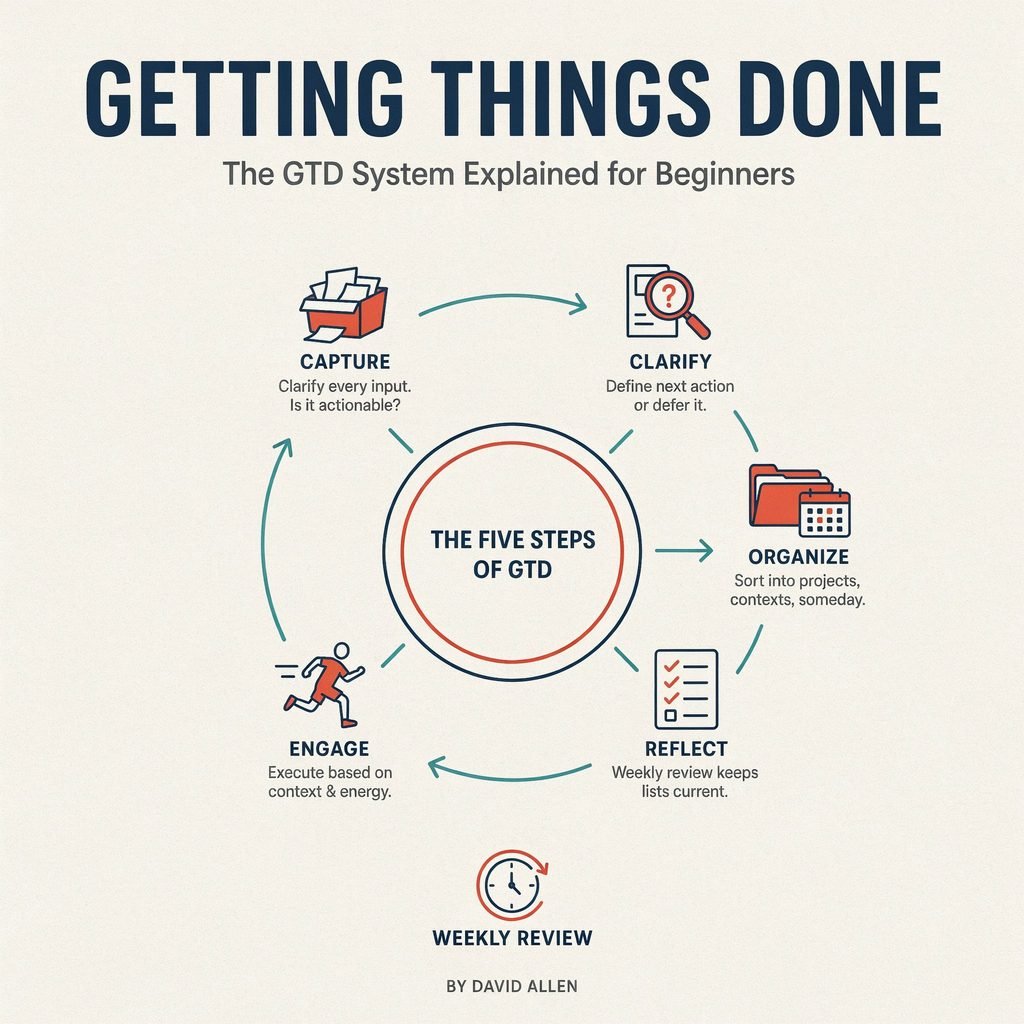
The foundation of this productivity method for beginners relies on a specific sequence. To master how to use GTD, you must follow the five steps: capture, clarify, organize, reflect, and engage.
Capture
The first step is to collect every single task, idea, worry, and commitment into one or more trusted inboxes. This is often called a “brain dump.” You must capture everything that has your attention, from a massive home renovation project to a reminder to buy dog food.
Do not try to organize or prioritize these items while you capture them. Just get them out of your head and onto paper or into a digital notes app. The goal is to identify all the “open loops” in your life so they stop distracting you.
- Beginner Tip: Keep a small pocket notebook or a dedicated notes app on your phone’s home screen.
- Real-Life Example: While driving, you remember you need to schedule an oil change. You safely pull over and type “schedule oil change” into your phone’s inbox app.
Clarify
Once your inbox is full, you must process each item one by one to decide what it actually means. Ask yourself a simple question: Is this item actionable?
If the item is not actionable, you have three choices: trash it, file it as reference materials, or add it to a “Someday/Maybe” list for the future. If the item is actionable, you must identify the very next physical action required to complete it.
If that next action takes less than two minutes, do it immediately. This is known as the famous two-minute rule. If it takes longer, you must either delegate it to someone else or defer it to your task lists.
- Beginner Tip: Never put an item back into the inbox once you pull it out.
- Real-Life Example: You pull a sticky note that says “Mom’s birthday.” You clarify that the next physical action is “Call florist to order delivery,” which takes three minutes, so you do it right then.
Organize
Now that you know what the actionable items are, you must put them in the right place. This is where you truly organize tasks and projects into specific categories.
Actionable items go into your Next Actions list, your Calendar, or your Waiting For list. Multi-step outcomes go onto your Projects list. You can also create context-based lists, such as “@Errands,” “@Calls,” or “@Computer,” to group similar tasks together.
- Beginner Tip: Keep your calendar sacred. Only put time-specific or date-specific commitments on it.
- Real-Life Example: “Pay mortgage” goes on your calendar for the 1st of the month, while “Research new laptop models” goes on your “@Computer” Next Actions list.
Reflect
A system is only useful if you actually trust it, and trust comes from regular task review. The most critical habit in the entire GTD workflow is the GTD weekly review.
Once a week, you must empty your head again, process all your inboxes, review your past and upcoming calendar, and update your lists. This weekly planning session ensures nothing slips through the cracks and keeps your system current.
- Beginner Tip: Block out one hour every Friday afternoon or Sunday morning specifically for your review.
- Real-Life Example: During your review, you notice a project has stalled. You realize you forgot to add the next action, so you update the list immediately.
Engage
The final step is simply doing the work. Because you have captured, clarified, and organized everything, you can now engage with your tasks with total focus and clarity.
You choose what to do in the moment based on four criteria: context, time available, energy level, and priority. If you only have fifteen minutes before a meeting and low energy, you can confidently tackle a quick “@Calls” task instead of staring blankly at a massive project.
- Beginner Tip: Trust your intuition. If your system is up to date, your gut feeling about what to do next is usually right.
- Real-Life Example: You have a free hour at a coffee shop, so you pull up your “@Errands” list and knock out three quick stops.
Key GTD Lists Every Beginner Needs
To manage tasks and priorities effectively, you need a few core lists. These lists form the backbone of your trusted productivity system.
- Inbox: The temporary holding zone for physical mail, digital notes, and random thoughts before they are processed.
- Next Actions list: A menu of single, physical tasks you can do right now, ideally sorted by context (e.g., @Home, @Office).
- Projects list: A list of all desired outcomes that require more than one action step to complete.
- Calendar: Reserved strictly for appointments, meetings, and tasks that absolutely must happen on a specific day or time.
- Waiting For list: A tracker for delegated tasks or items you are waiting on someone else to provide.
- Someday/Maybe list: A parking lot for cool ideas, future vacations, or hobbies you want to explore but are not committing to right now.
- Reference list: A digital or physical filing system for non-actionable information like insurance policies, recipes, or software manuals.
It is vital to understand the difference between a project and a next action. A project is an outcome, while a next action is the visible physical step that moves it forward. You cannot “do” a project; you can only do the actions related to it.
- Project: Plan a family vacation.
- Next action: Compare flight prices for Chicago to Orlando.
- Waiting For: Reply from the hotel about room availability.
- Someday/Maybe: Learn basic photography.
How to Set Up a Simple GTD System
Starting a new GTD task management routine does not require expensive software. Follow these simple steps to build your foundation.
- Choose one primary capture tool. This could be a notes app on your phone, a physical notebook, or an email inbox. Keep it simple and accessible.
- Do a complete brain dump. Write down every single open loop, worry, task, and idea currently bouncing around in your head.
- Process each item one at a time. Apply the clarify step to every single item in your inbox until it is completely empty.
- Create the core GTD lists. Set up your Next Actions, Projects, Waiting For, and Someday/Maybe lists in your chosen tool.
- Add time-specific commitments to the calendar. Move all appointments, doctor visits, and hard deadlines out of your task lists and onto your calendar.
- Schedule a weekly review. Put a recurring, one-hour appointment on your calendar to maintain your system.
You can use digital GTD tools such as Todoist, Microsoft To Do, Notion, Trello, or Asana to manage these lists. However, do not feel pressured to download complex apps if a simple paper planner works better for your brain. Avoid overcomplicating your setup with too many tags or folders right out of the gate.
A Beginner GTD Example
Let us look at how the GTD method explained above works in a real-life scenario. Imagine you write down “Plan my daughter’s birthday party” in your inbox.
If you leave it on a standard to-do list, it will just stare at you and cause anxiety because it is too big to tackle. Here is how you process it through the Getting Things Done system:
- Project: Plan daughter’s birthday party. (This goes on your Projects list).
- Next action: Make a guest list. (This goes on your Next Actions list).
- Calendar item: Call the bakery at 2:00 p.m. on Friday to order the cake.
- Waiting For: Confirmation from the party venue regarding the reservation.
- Reference: Birthday party theme ideas and budget notes saved in a digital folder.
By breaking the party down, you know exactly what to do next. When you sit down at your desk, you simply look at your Next Actions list and start making the guest list.
Benefits of Using GTD
Adopting this system offers realistic, life-changing benefits for busy people. The most immediate change you will notice is a massive reduction in mental clutter.
When you stop using your brain as a storage hard drive, you free up cognitive energy for deep, focused work sessions. You will experience far less stress from forgotten tasks, missed school drop-offs, or late fees on utility bills.
GTD also provides better visibility into your actual commitments. You will easily see the difference between urgent daily tasks, future ideas, and delegated work. Ultimately, this leads to much easier project planning and a healthier approach to time management.
Common GTD Mistakes Beginners Make
Even with a great system, beginners often stumble over a few common hurdles. Here are the most frequent errors and how to fix them.
Treating projects as single tasks.
Writing “Fix car” on a to-do list is a mistake. Fix it by defining the actual project and writing down the next physical action, like “Call mechanic for estimate.”
Keeping too many separate inboxes.
If you have notes on your desk, voice memos on your phone, and three different email inboxes, things will get lost. Fix this by designating one primary capture tool and routing everything else to it.
Failing to process the inbox regularly.
An inbox is a processing station, not a storage unit. Fix this by committing to emptying your inbox to zero at least once a day.
Writing vague tasks.
“Work on budget” is too ambiguous, which leads to procrastination. Fix it by writing clear next actions, like “Download bank statements for March.”
Skipping the weekly review.
If you skip the GTD weekly review, your lists will become outdated, and you will stop trusting the system. Fix this by treating your review appointment as a non-negotiable meeting with yourself.
Overcomplicating the system.
Adding fifty custom tags and complex color-coding on day one is a recipe for burnout. Fix this by starting with basic lists and only adding complexity when you truly need it.
Using the calendar as a wish list.
Writing “Hope to go to the gym” on your calendar for Tuesday ruins the integrity of your schedule. Fix this by only putting hard landscape items—things that must happen on that specific day—on your calendar.
Frequently Asked Questions
What does GTD stand for?
GTD stands for Getting Things Done, which is the title of the bestselling book and productivity methodology created by David Allen.
Is GTD good for beginners?
Yes, the GTD system for beginners is highly effective because it provides a clear, logical flowchart for handling any task or obligation that comes your way.
Do I need an app to use GTD?
No, you do not need a specific app. You can successfully run a complete GTD organization system using index cards, a cheap notebook, or a basic word processor.
How often should I do a GTD weekly review?
You should aim to do a full review once a week. Most people prefer Friday afternoons to close out the workweek, or Sunday evenings to prepare for the week ahead.
What is the difference between a project and a next action in GTD?
A project is any desired outcome that requires more than one action step to complete. A next action is the very next physical, visible activity you must do to move that project forward.
Conclusion
You do not need a perfect, flawlessly color-coded productivity system to get your life organized. The beauty of the Getting Things Done system is its flexibility and its focus on practical, real-world execution.
Start by simply capturing everything that has your attention. Choose one next physical action to move your most important project forward, and commit to reviewing your lists consistently.
You have the tools to eliminate mental clutter and finally take control of your time. Start today with a 15-minute brain dump and build your Getting Things Done system one list at a time.