You open your laptop. Your inbox has 47 unread emails. Your task list stretches across three pages. Your phone is buzzing with notifications, and your calendar is stacked with back-to-back meetings. Sound familiar?
If you’re constantly juggling competing priorities and still feel like you’re getting nothing meaningful done, you’re not alone. According to recent productivity research, the average worker is productive for just under three hours in a typical eight-hour day. The rest gets swallowed by interruptions, context switching, and low-value busywork.
The problem isn’t that you lack time. The problem is that you lack a clear system for deciding what deserves your attention first.
That’s where the Eisenhower Matrix comes in. This simple, four-quadrant time management technique has helped everyone from military generals to Fortune 500 executives separate what truly matters from what just feels urgent. In this guide, you’ll learn exactly how to use the Eisenhower Matrix to prioritize your to-do list, reduce stress, and finally focus on the tasks that move the needle in your career and personal life.
What Is the Eisenhower Matrix?
The Eisenhower Matrix — also known as the Eisenhower decision matrix, the urgent-important matrix, or the time management matrix — is a task prioritization method that helps you decide what to do first, what to schedule, what to delegate, and what to eliminate altogether.
It’s built on a simple but powerful idea: not all tasks are created equal. Some demand your immediate attention but don’t actually matter in the long run. Others are critically important to your goals but never seem urgent enough to get done. The Eisenhower Matrix forces you to confront that distinction head-on.
A Quick History Lesson
The framework gets its name from Dwight D. Eisenhower, the 34th President of the United States and a five-star general who served as Supreme Commander of the Allied Forces during World War II. Eisenhower was legendary for his ability to sustain high levels of productivity over decades. In a 1954 speech, he quoted an unnamed university president who said, “I have two kinds of problems, the urgent and the important. The urgent are not important, and the important are never urgent.”
Decades later, Stephen Covey popularized Eisenhower’s principle in his bestselling book The 7 Habits of Highly Effective People, transforming it into the practical productivity framework millions use today.
The Four Quadrants, Explained
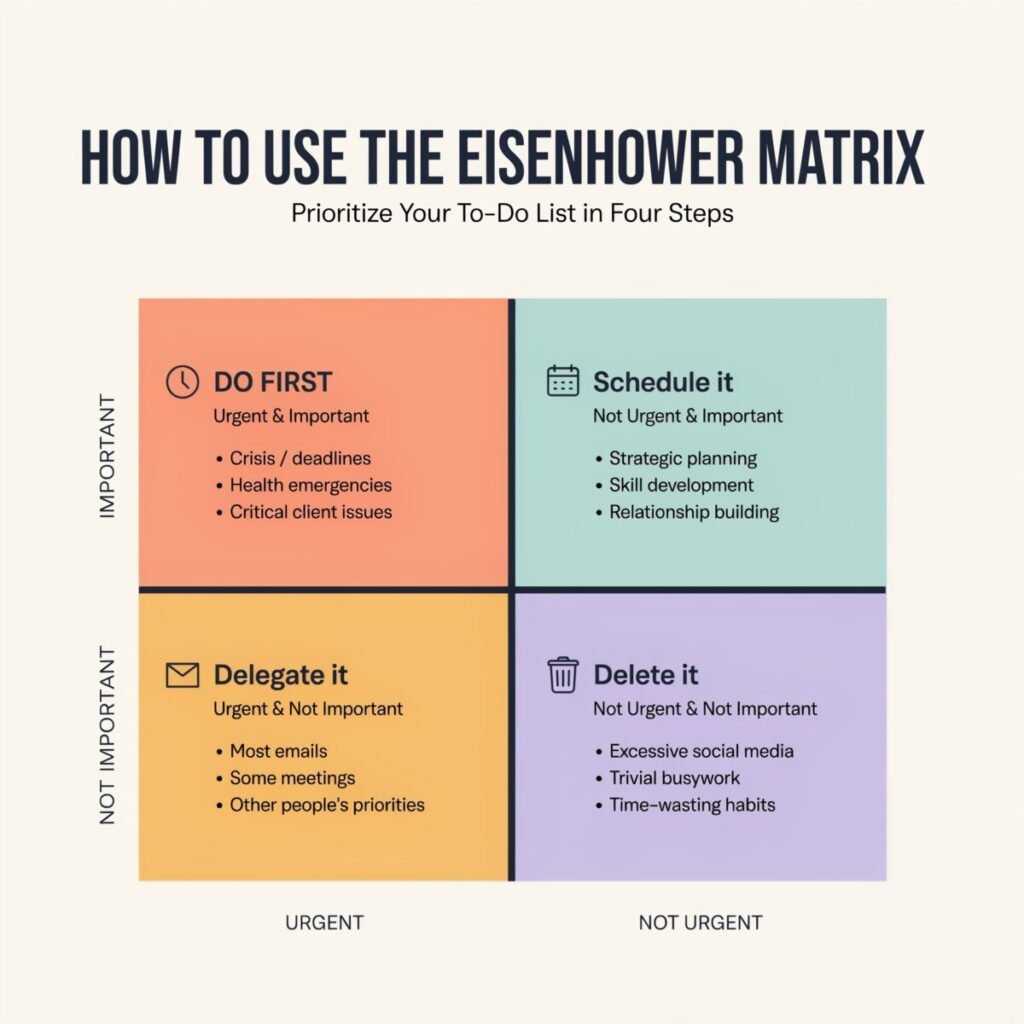
The Eisenhower Matrix is a 2×2 grid with two axes:
- Urgency (horizontal axis): Does this task need attention right now?
- Importance (vertical axis): Does this task contribute meaningfully to my long-term goals, values, or mission?
That intersection creates four distinct quadrants, each with its own strategy:
| Quadrant | Criteria | Action |
|---|---|---|
| Quadrant 1 | Urgent AND Important | Do it now |
| Quadrant 2 | Important but NOT Urgent | Schedule it |
| Quadrant 3 | Urgent but NOT Important | Delegate it |
| Quadrant 4 | Neither Urgent NOR Important | Delete or minimize it |
The magic of this productivity framework lies in its simplicity. Instead of staring at a giant to-do list and guessing what to tackle next, you get a clear summary of what truly matters, what can wait, what to hand off to someone else, and what to drop entirely.
How to Create the Matrix
Building your first Eisenhower Matrix takes about five minutes. Here’s how to do it.
Step 1: Draw a 2×2 Grid
Grab a piece of paper, open a blank document, or use a digital whiteboard. Draw a square and divide it into four equal boxes.
Step 2: Label Your Axes
Label the left column “Urgent” and the right column “Not Urgent.” Label the top row “Important” and the bottom row “Not Important.” This gives you your four quadrants:
- Top-left: Urgent + Important (Do Now)
- Top-right: Not Urgent + Important (Schedule)
- Bottom-left: Urgent + Not Important (Delegate)
- Bottom-right: Not Urgent + Not Important (Delete)
Step 3: Brain Dump Every Task
Before you start sorting, write down everything on your plate — work deadlines, personal errands, long-term projects, recurring chores, and everything in between. Don’t filter or judge at this stage. The goal is to get every loose end out of your head and onto the page.
This includes the “invisible” work that often gets overlooked: follow-up emails you owe someone, decisions you’ve been putting off, research you need to do, and conversations you need to have. When your mind isn’t occupied with remembering every commitment, it can focus on evaluating what actually matters most.
Step 4: Sort Tasks Into Quadrants
Now take each task on your list and place it in the appropriate quadrant. Ask yourself two questions for every item:
- Is this urgent? Does it have a hard deadline, pressing consequences, or time-sensitive demands?
- Is this important? Does it meaningfully advance my goals, values, or long-term success?
Be honest. The entire value of this to-do list prioritization method depends on accurate sorting.
How to Use Each Quadrant
Now that your matrix is built, here’s exactly what to do with the tasks in each box — along with real-world examples for work, home, school, and personal life.
Quadrant 1: Do Now (Urgent and Important)
These are the fires you need to put out immediately. They’re time-sensitive, high-stakes, and carry real consequences if you delay them.
Examples:
- Finishing a client deliverable due at 5 PM today
- Fixing a critical bug that’s affecting customers
- Responding to an urgent escalation from your manager
- Paying a bill that’s overdue and about to incur late fees
- Handling a family emergency
How to manage this quadrant: Do these tasks as soon as possible. However, a healthy Eisenhower Matrix keeps Quadrant 1 relatively small. If this box is constantly overflowing, it’s usually a sign that important-but-not-urgent work in Quadrant 2 has been neglected until it became a crisis.
Quadrant 2: Schedule (Important but Not Urgent)
This is the most powerful quadrant in the entire matrix. These tasks don’t scream for your attention, but they’re the ones that actually build your career, strengthen your relationships, and improve your life over time.
Examples:
- Strategic planning for next quarter’s goals
- Learning a new skill or taking a professional development course
- Exercising, meal prepping, and scheduling preventive health appointments
- Networking and relationship building
- Long-term financial planning and investing
- Spending quality time with family
How to manage this quadrant: Block dedicated time on your calendar for these tasks — and treat those blocks as non-negotiable. Professional time managers recognize Quadrant 2 as the most valuable quadrant because this is where you prevent future crises and invest in long-term success. Schedule important tasks before your calendar fills up with other people’s priorities.
Quadrant 3: Delegate (Urgent but Not Important)
These tasks feel pressing because someone else wants something from you right now, but they don’t actually advance your own goals. They’re often interruptions, routine requests, and favors that create the illusion of productivity while distracting you from the work that truly matters.
Examples:
- Most emails and instant messages that demand immediate responses
- Meetings where your presence isn’t essential
- Uploading approved content or scheduling social media posts
- Routine administrative work like data entry or filing
- Non-critical requests from coworkers
How to manage this quadrant: Delegate tasks whenever possible. If you can’t delegate, automate, batch, or set firm boundaries. For example, check email only at set times instead of responding to every ping as it arrives. The goal is to minimize the time these tasks consume without letting them derail your day.
Quadrant 4: Delete (Not Urgent and Not Important)
These are the time-wasting tasks that add no real value to your life or work. They’re comfortable distractions — the things you do to avoid harder thinking or more demanding effort.
Examples:
- Mindless scrolling through social media
- Attending status meetings that could have been an email
- Over-organizing files or polishing work that’s already “good enough”
- Binge-watching random content during productive hours
- Browsing the internet without a clear purpose
How to manage this quadrant: Eliminate time-wasting tasks whenever possible. Some of these activities — like watching your favorite show or scrolling through Instagram — are fine in moderation as intentional breaks. But they shouldn’t live on your to-do list, and they shouldn’t eat into the time you’ve reserved for Quadrant 1 and Quadrant 2 work.
Example: A Filled-Out Eisenhower Matrix for a Busy Professional
Let’s see what this looks like in practice. Here’s a sample matrix for a marketing manager trying to manage her workload on a typical Monday morning:
| Quadrant | Tasks |
|---|---|
| Q1: Do Now | Finalize presentation for tomorrow’s executive meeting. Respond to customer complaint escalation. Fix broken link on the campaign landing page. |
| Q2: Schedule | Develop Q3 content strategy. Schedule one-on-ones with team members. Attend industry networking event next month. Create documentation for campaign processes. |
| Q3: Delegate | Upload approved blog posts to the CMS. Schedule social media posts for the week. Compile meeting attendance list. Respond to Dave’s non-critical internal request. |
| Q4: Delete | Browsing competitor websites without a clear purpose. Attending the weekly status meeting that could be an email. Mindless Slack conversations unrelated to work. |
Notice how the same type of task — like a meeting — can land in different quadrants depending on context. A one-on-one with a team member is Quadrant 2 (relationship building and leadership). A weekly status meeting with no clear agenda is Quadrant 4 (a waste of time). The matrix forces you to evaluate each task on its own merits.
Common Mistakes to Avoid
The Eisenhower Matrix is simple, but it’s not always easy. Here are the most common pitfalls that derail people when they first start using this productivity framework — and how to avoid them.
1. Confusing Urgency with Importance
This is the single biggest mistake people make when distinguishing between urgent vs important tasks. Something feels urgent because it’s loud, last-minute, or coming from someone in authority — but that doesn’t make it important to your own goals.
The fix: Always tie “importance” to your long-term vision, not to external pressure. Ask yourself: Does this task contribute to my core goals, values, or mission? If the answer is no, it probably belongs in Quadrant 3 or 4, regardless of how urgently someone is asking for it.
2. Overloading Quadrant 1
If your “Do Now” quadrant has more than five or six tasks, you’re setting yourself up for burnout. When everything is a crisis, nothing actually gets the focused attention it needs.
The fix: Be ruthless about what qualifies as truly urgent and important. Most of what feels like a Quadrant 1 crisis is actually a Quadrant 2 task that you ignored until it became urgent. Invest more time in Quadrant 2 to keep Quadrant 1 manageable.
3. Failing to Delegate Quadrant 3 Tasks
Many people feel guilty about delegating or simply saying “no” to urgent but unimportant requests. They end up doing everything themselves, which guarantees they’ll never have time for the work that actually matters.
The fix: Reframe delegation as a productivity skill, not a character flaw. Delegate less important work so you can focus on important tasks. If you can’t delegate to a person, see if you can automate the task, batch it into a dedicated time block, or simply say no.
4. Ignoring Quadrant 2 Until It Becomes Urgent
This is the most insidious mistake. Important-but-not-urgent tasks — like strategic planning, skill building, and relationship maintenance — never come with flashing red alerts. So they get perpetually pushed aside until they explode into Quadrant 1 crises.
The fix: Schedule important tasks on your calendar before the week fills up. Block recurring time for Quadrant 2 work and protect it fiercely. This is where real growth happens, and it’s where you reduce stress by preventing future fires.
5. Never Updating Your Matrix
Your priorities shift as projects evolve, deadlines approach, and new opportunities emerge. A matrix you built on Monday may be completely outdated by Wednesday afternoon.
The fix: Review and update your matrix regularly — at least daily, or during weekly planning sessions for longer-term work. Move tasks between quadrants as circumstances change. A Quadrant 2 task might graduate to Quadrant 1 as its deadline approaches, while a Quadrant 3 request might become irrelevant altogether.
How to Apply It Daily
Now that you understand the framework, here’s how to actually use the Eisenhower Matrix in your daily life — whether you’re a busy professional, a student, a parent, or all of the above.
Morning Planning (5–10 Minutes)
The best time to build your matrix is first thing in the morning, before your inbox and calendar hijack your attention. Spend five to ten minutes reviewing your daily task list, sorting items into quadrants, and deciding exactly what you’ll do today.
Start with Quadrant 1. Identify the one or two urgent and important tasks that must get done today, and block time for them immediately. Then schedule your Quadrant 2 work before the rest of your day fills up with other people’s demands. Finally, decide what you’ll delegate and what you’ll delete.
End-of-Day Review (5 Minutes)
At the end of each workday, take five minutes to review what you accomplished and what rolled over. Update your matrix, move tasks between quadrants as needed, and set yourself up for a productive tomorrow. This simple habit prevents tasks from falling through the cracks and gives you a clear starting point the next morning.
Weekly Planning (15–20 Minutes)
Once a week — typically Sunday evening or Monday morning — zoom out and look at your entire week. Build a fresh matrix for the week ahead, identify your top priorities, and block time for Quadrant 2 work on your calendar. Weekly planning helps you manage your workload proactively instead of reactively, and it ensures that important-but-not-urgent goals don’t get perpetually postponed.
Reduce Distractions While You Work
The Eisenhower Matrix tells you what to focus on. But to actually focus, you need to reduce distractions during your work blocks. Try these tactics:
- Turn off non-essential notifications during Quadrant 1 and Quadrant 2 work blocks
- Use a timer to stay focused on a single task (the Pomodoro Technique works well here)
- Communicate your priorities to coworkers and family members so they know when you’re in deep work mode
- Close unnecessary browser tabs and apps that compete for your attention
Use It for Personal Productivity, Too
The Eisenhower Matrix isn’t just for work tasks. Use it to prioritize your to-do list at home as well. Whether you’re planning a home renovation, managing your family’s schedule, studying for exams, or trying to build healthier habits, the same four-quadrant framework applies.
For example, a college student might sort tasks like this:
- Q1 (Do Now): Submit tomorrow’s assignment, study for Friday’s midterm
- Q2 (Schedule): Research internship opportunities, outline next month’s term paper, schedule a study group
- Q3 (Delegate): Ask a classmate to share notes from a class you missed, delegate group project logistics to a teammate
- Q4 (Delete): Mindless TikTok scrolling during study blocks, reorganizing notes that are already organized
Conclusion
The Eisenhower Matrix isn’t a complicated productivity system that requires expensive software or weeks of training. It’s a simple, four-quadrant decision-making tool that helps you answer the most important question in time management: What deserves my attention right now?
By separating urgent tasks from important ones, you stop reacting to every ping and notification and start making intentional decisions about how you spend your time. You focus on important tasks that move your goals forward. You delegate less important work that drains your energy. You eliminate time-wasting tasks that don’t belong on your list in the first place. And most importantly, you carve out space for the important-but-not-urgent work that builds your career, your relationships, and your life over the long term.
Whether you use it for daily planning, weekly planning, or just to sort through a particularly overwhelming to-do list, the Eisenhower Matrix gives you a clear, actionable framework to improve productivity — without burning out in the process.
So grab a piece of paper, draw your 2×2 grid, and start sorting. Your future self — calmer, more focused, and more in control — will thank you.